The Five-Minute Window That Decides Your Revenue
Here's a number that should change the way you run your credit repair business: leads contacted within five minutes are 21 times more likely to convert than leads contacted after 30 minutes. Not twice as likely. Not five times. Twenty-one times.
That stat comes from a landmark study by Dr. James Oldroyd at MIT, later expanded by InsideSales.com across over 100,000 call attempts. The research is unambiguous — the single biggest factor separating high-converting credit repair companies from struggling ones isn't their pricing, their dispute strategy, or their marketing spend. It's how fast they respond to a new lead.
Yet the average small business takes 47 hours to respond to a web lead. Nearly half never respond at all. In credit repair, where your potential client is actively searching for help and likely filling out forms with two or three competitors simultaneously, that delay is a death sentence.
This article breaks down the science behind speed to lead, shows you exactly what the research says, and walks through how automated email campaigns solve the problem — with a real-world example of what these emails look like in practice.
What the Research Actually Says
The Decay Curve
Lead responsiveness doesn't decline gradually. It falls off a cliff.
A joint Harvard Business Review and InsideSales.com study analyzed the response patterns of 2,241 companies and found a clear decay curve:
| Response Time | Relative Conversion Rate |
|---|---|
| Within 1 minute | 391% higher than at 2 minutes |
| Within 5 minutes | 21x more likely to qualify vs. 30 minutes |
| Within 10 minutes | 4x more likely to qualify vs. 30 minutes |
| After 30 minutes | Conversion rate drops dramatically |
| After 1 hour | Virtually no improvement over not calling at all |
The first five minutes are where the vast majority of your conversion potential lives. After that window closes, you're competing with inertia, distraction, and the competitor who already reached out.
Why the Drop-Off Is So Steep
When someone fills out a credit repair inquiry form, they're in a specific mental state:
- Active problem awareness — They're thinking about their credit right now, not tomorrow
- Research mode — They're at their computer or phone, comparing options
- Emotional readiness — Bad credit is stressful. They've worked up the motivation to act
- Low switching cost — They haven't committed to anyone yet
Every minute that passes, each of these factors weakens. They close the browser tab. They get distracted by work. The emotional urgency fades. By the time you call them 24 hours later, they barely remember filling out the form — or they've already signed up with someone who answered first.
The Competitive Advantage
Here's what makes speed to lead especially powerful in credit repair: most of your competitors are slow. The same InsideSales.com research found that only 27% of leads ever get contacted at all. If you're among the first to respond, you're not just early — you're often the only one who responded while the lead was still engaged.
In a market where the service itself (credit disputes, bureau communications, score monitoring) is largely commoditized, being first creates an outsized advantage. The lead doesn't need to compare your dispute methodology against three competitors. They need someone who showed up, seemed professional, and made it easy to get started.
The Real Cost of Slow Response
Let's put real numbers on this for a credit repair business.
Scenario: You spend $2,000/month on marketing (Google Ads, Facebook, referral commissions) and generate 100 leads per month. Your current conversion rate is 8% because your team responds within a few hours during business hours, and not at all on nights or weekends.
| Metric | Slow Response (Hours) | Fast Response (< 5 Min) |
|---|---|---|
| Monthly leads | 100 | 100 |
| Conversion rate | 8% | 20%+ |
| New clients/month | 8 | 20+ |
| Revenue per client (3 months avg) | $450 | $450 |
| Monthly revenue from new clients | $3,600 | $9,000+ |
| Cost per acquisition | $250 | $100 |
The marketing spend is identical. The leads are identical. The only difference is how quickly you make first contact. Even conservative estimates show a 2-3x improvement in conversion rate when response time drops from hours to minutes.
And unlike adding a new marketing channel — which requires testing, iteration, and additional budget — speed to lead improvements happen immediately with the leads you're already paying for.
Why Manual Follow-Up Fails
If speed to lead is this important, why doesn't everyone just... respond faster?
Because manual follow-up doesn't scale. Here's what actually happens in most credit repair operations:
The morning rush: Your team arrives at 9 AM and finds 6 leads that came in overnight. They start calling. Two answer, four go to voicemail. While they're leaving voicemails, three more leads come in from a Facebook campaign. Now they're behind.
The afternoon gap: Your top salesperson is on a consultation call for 45 minutes. During that window, two high-intent leads submit forms. Nobody notices until the call ends. Those leads have already moved on.
Weekends and holidays: Your team doesn't work Saturdays, but Google Ads does. Every lead that comes in between Friday at 6 PM and Monday at 9 AM sits untouched for 40+ hours. That's potentially 30-40% of your weekly leads receiving zero response during the highest-intent window.
The scaling problem: When you're handling 10 leads a week, manual follow-up works. At 50 leads a week, you start missing some. At 100+, you need a system — or you need to hire more people, which cuts into the margins that made those leads profitable in the first place.
The answer isn't more salespeople. It's automation that ensures every lead gets a professional, personalized response within minutes — regardless of when they inquire.
Email Automation: Your Always-On First Responder
Automated email campaigns solve the speed-to-lead problem by removing the human bottleneck from initial contact. When a new lead enters your system, the automation fires immediately — no waiting for someone to check a dashboard, no depending on business hours, no leads falling through the cracks.
But not all automated emails are created equal. A generic "Thanks for your inquiry, we'll be in touch" is barely better than no response. The emails that actually convert are:
1. Personal and Branded
The lead should feel like they're hearing from a real person at a real company — not a robot. That means your company logo, your brand colors, a real name, and a real phone number. The email should read like it was written by the person who will actually be working with them.
2. Value-First
Don't just acknowledge the inquiry. Give the lead something useful immediately. Explain what you do, what they can expect, and what makes your approach different. Address their pain point (bad credit) and position your service as the solution.
3. Clear Next Steps
Every automated email needs a clear call to action. Whether it's "Claim Your Free Credit Consultation," "Access Your Client Portal," or "Schedule a Call" — tell the lead exactly what to do next and make it easy.
4. Multi-Touch
One email isn't enough. The best lead nurture sequences include 3-5 touches over the first week, each adding value and reducing friction. The first email is the hook. Follow-ups can address common objections, share success stories, or remind them of the consultation offer.
What This Looks Like in Practice
Here's a real example of an automated lead response email built using WhiteLabelCRO's campaign system. This is from a credit repair company called Elite Connections — it was sent automatically within minutes of a new lead inquiry:
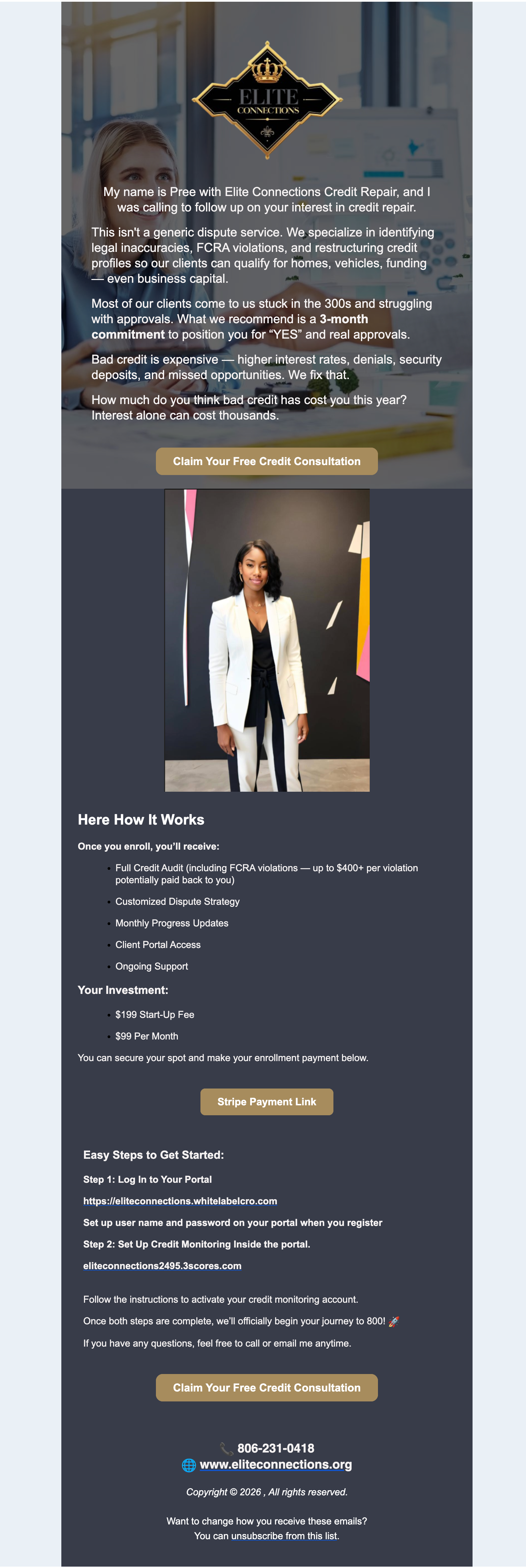
Let's break down why this email works:
Branded header with company logo — The Elite Connections logo and brand colors are front and center. This isn't a generic template. It's their email, reinforcing brand recognition from the first touchpoint.
Personal introduction — The email opens with "My name is Pree with Elite Connections Credit Repair, and I was calling to follow up on your interest in credit repair." It reads like a personal message, not a marketing blast.
Clear value proposition — The email immediately addresses what they do: "We specialize in identifying legal inaccuracies, FCRA violations, and restructuring credit profiles." It speaks directly to the lead's situation — "Most of our clients come to us stuck in the 300s and struggling with approvals."
Transparent pricing — No bait and switch. The lead sees "$199 Start-Up Fee / $99 Per Month" right in the email. This builds trust and pre-qualifies the lead before you ever get on the phone.
Step-by-step onboarding — The email tells the lead exactly what to do: Step 1 is access their client portal with a direct link. Step 2 is set up credit monitoring. This reduces friction and gets motivated leads started before a competitor even responds.
Multiple calls to action — Two "Claim Your Free Credit Consultation" buttons give the lead clear ways to engage. A payment link is included for leads ready to commit immediately.
Contact information — Phone number, website, and email are all visible. The lead has every channel available to reach out.
This entire email was sent automatically. No one on the Elite Connections team had to write it, hit send, or even be online. The automation triggered the moment the lead entered the system.
Building Your Speed-to-Lead Automation
Setting up an automated lead response in WhiteLabelCRO takes a few steps. Here's how the system works:
Step 1: Create a Campaign with a "New Lead" Trigger
In the Automations section of your admin dashboard, create a new campaign and select "New Lead" as the event trigger. This tells the system to fire whenever a new lead is added — whether they came in through your website form, an affiliate referral, or a manual entry by your team.
Step 2: Build Your Email Message
Add a message to the campaign and set the wait time. For your first-touch email, set the delay to 0 days, 0 hours, 0 minutes — meaning it fires immediately when the trigger occurs.
Use the email template editor to build your message. You can include rich HTML formatting, images, your company logo, and any layout that matches your brand. The system supports over 50 merge tags for personalization, including:
- — The lead's first name
- — Your company name
- and — Your company logo
- — A direct link to your client portal
- and — The assigned team member's info
- — Your credit monitoring provider URL
- — Today's date
These tags are replaced automatically with each lead's specific information, so every email feels personal even though it's fully automated.
Step 3: Add Follow-Up Messages
A single email isn't a sequence. Add additional messages to the same campaign with increasing delays:
- Message 1 (0 minutes): Welcome email with introduction, services, and next steps
- Message 2 (1 day): Follow-up asking if they have questions, addressing common concerns about credit repair timelines
- Message 3 (3 days): Share a success story or testimonial. Remind them of the consultation offer
- Message 4 (7 days): Final check-in. Emphasize urgency — "Every month without action is another month of high interest rates and denied applications"
Each message can have its own condition. For example, you can set Message 2 to only send if the lead hasn't signed their client agreement yet — so leads who already converted don't get unnecessary follow-ups.
Step 4: Add SMS to the Mix
Campaigns in WhiteLabelCRO support both email and SMS messages in the same automation. Consider adding a text message as your second touch:
Hi
{Client_First_Name}, this is{EmployeeFullName}from{COMPANY NAME}. I just sent you an email about getting started with credit repair. Feel free to text me back or call at{EmployeePhone}. Looking forward to helping you!
SMS open rates are over 90%, and a quick text within the first hour is a strong complement to the initial email.
Step 5: Enable and Monitor
Toggle the campaign to Enabled and it runs automatically. The campaign processor checks for new triggers every two minutes, so leads will receive their first email within minutes of entering the system.
Campaigns respect business hours by default (8 AM – 9 PM), so your leads won't receive emails at 3 AM. But crucially, the system queues the message immediately and delivers it as soon as the business-hours window opens — so a Saturday night lead gets contacted first thing Sunday morning, not Monday afternoon.
Beyond the First Email: Automations for Every Stage
Speed to lead gets the conversation started, but the automation doesn't have to stop there. WhiteLabelCRO's campaign system supports 26 different event triggers that cover the full client lifecycle:
Onboarding automations:
- "Client Agreement Assigned" — Remind clients to sign their service agreement
- "Client Uploaded Document" — Confirm receipt and tell them what's next
- "Credit Monitoring Entered" — Let them know you're ready to pull their report
Engagement automations:
- "First Sign In" — Welcome them to the portal, give them a quick tour
- "Payment Made" — Thank them and confirm the transaction
- "Credit Scores Changed" — Celebrate wins with automated score-change notifications
- "Dispute Status Repaired Deleted" — Notify clients when items are removed from their reports
Retention automations:
- "Inactive Date" — Re-engage clients who haven't logged in or responded
- "Invoice Due Date" — Gentle payment reminders before due dates
- "Payment Failed" — Prompt clients to update their payment information
Each trigger can have multiple messages with different delays, conditions, and channels. A client who signs their agreement gets a congratulatory email immediately and an onboarding checklist the next day. A client whose payment fails gets an SMS within the hour and a follow-up email the next day.
Speed to Lead Best Practices
Based on the research and what we see working across credit repair businesses on our platform:
Respond in Under 5 Minutes
This is the single most impactful change you can make. Automated email handles this by default — set your first message delay to zero and every lead gets contacted instantly.
Use Multiple Channels
Email first, SMS second. The email provides detailed information and branding. The text message creates urgency and opens a direct communication line. Together, they're significantly more effective than either alone.
Personalize Beyond the Name
Using {Client_First_Name} is table stakes. Include the assigned employee's name and phone number so the lead knows who to call back. Include your company logo and portal link. The more specific the email feels, the more likely the lead is to engage.
Don't Over-Sell in the First Touch
Your first automated email should educate and invite, not hard-sell. Explain what you do, show your pricing transparently, and give clear next steps. The hard sell comes later — if it's needed at all — after you've built some trust.
Set Conditions to Avoid Redundancy
If a lead converts after the first email, they shouldn't receive four more "are you still interested?" follow-ups. Use campaign conditions like "Agreement not signed" to automatically skip messages for leads who've already taken action.
Track What's Working
Review your campaign logs to see which messages are sending successfully, which leads are converting, and where drop-offs happen. If leads open the first email but don't take action, the content or call-to-action might need adjustment.
The Math Is Simple
Credit repair is a competitive market. The businesses that grow aren't necessarily the ones with the best dispute strategies or the lowest prices. They're the ones that show up first, look professional when they do, and make it effortless for the lead to say yes.
Speed to lead isn't a hack or a trick. It's the natural result of respecting how people make decisions — they act when they're motivated, and motivation fades fast. The research across hundreds of thousands of leads is clear: faster response equals higher conversion. Period.
Automated email campaigns make speed to lead achievable without a 24/7 sales team. One well-crafted automation handles what would otherwise require multiple employees monitoring lead sources around the clock. And because the emails are branded, personalized, and value-driven, they often outperform manual first-contact attempts anyway.
If you're spending money to generate leads but not automating your first response, you're leaving the majority of your conversion potential on the table. Fix the five-minute window first. Everything else in your business gets easier when more leads actually become clients.
